Save for your goals with DreamUp

Build better saving habits with DreamUp, Numerica’s mobile app tool that turns small automatic deposits into steady progress toward your goals.
Hero Personal Numerica

Turn your savings goals with into action


DreamUp is Numerica’s savings tool available in our mobile app. Set a goal, save automatically, and watch your progress grow.

Saving for what matters does not have to be complicated. DreamUp helps you turn everyday moments into real financial progress.

Set a goal, choose how you want to save, and let DreamUp help keep you on track.

🔓Not a member yet? Join Numerica to get started.

📲Already a member? Open your Numerica Mobile App and tap the DreamUp icon

What is DreamUp?

DreamUp is a digital savings tool built into the Numerica Mobile App. It helps you:

  • Set personal savings goals
  • Automate how and when you save
  • See your progress in real time

Instead of guessing where your money is going, DreamUp gives your savings a clear purpose and a simple plan.

Want a step-by-step walkthrough to get started with DreamUp? Read our guide on how to save with DreamUp.

Why use DreamUp?

DreamUp is designed to make saving feel easier and more rewarding. It can help you:

  • Save for big goals, like a vacation or new set of wheels
  • Build an emergency fund for life’s surprises
  • Pay down debt faster by setting payoff goals
  • Create a stronger sense of financial security

You decide what matters most. DreamUp helps you move toward it, one deposit at a time.

How DreamUp works in the Numerica app

You are just a few taps away from putting DreamUp to work.


Create a dream that inspires you

  • Open the Numerica Mobile App
  • Tap the DreamUp icon at the bottom of the screen
  • Scroll to “What’s your next dream” and tap “Create your own

From there, you can:

  • Choose a photo from the image library to represent your dream
  • Give your dream a name that feels meaningful
  • Decide how much you want to save and by when

You can keep your dream private or invite friends and family who are Numerica members to save toward the same goal.

Use savehacks to grow your dream


Once your dream is set up, it is time to start saving. 

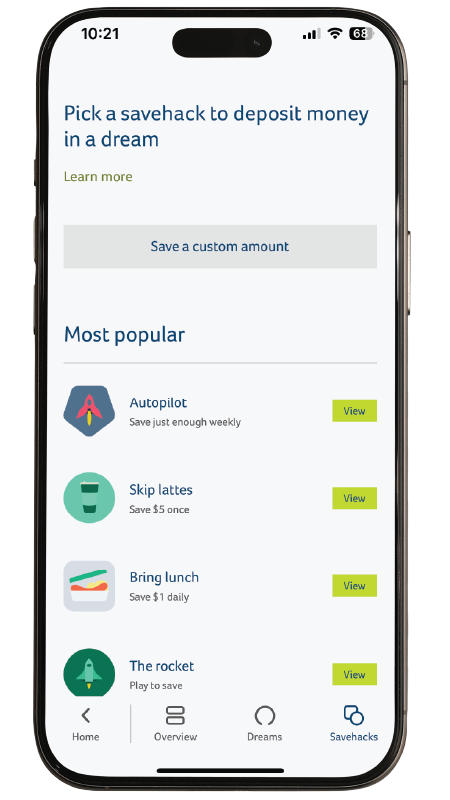
DreamUp offers flexible savehacks that move money toward your goal in ways that fit your life, such as:

  • Setting up daily, weekly, or monthly deposits
  • Moving a few dollars when you make certain choices, like brewing coffee at home
  • Adding extra when there is room in your budget

You can adjust your savehacks or make one-time deposits at any time by tapping the photo of your dream in the app.
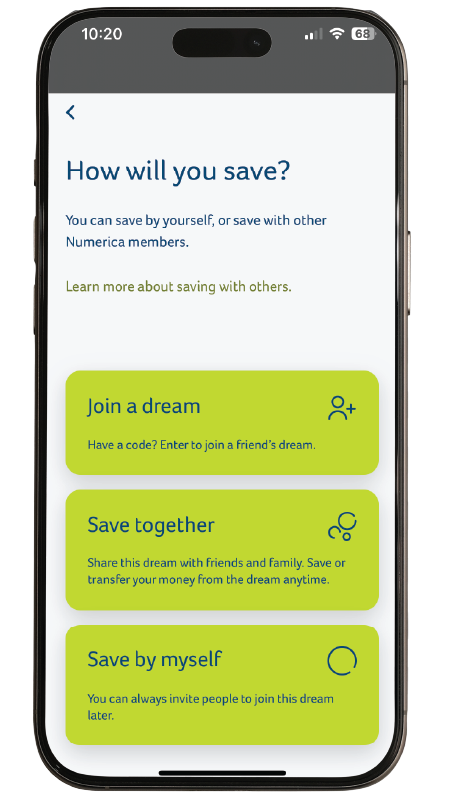


See your savings in action

DreamUp lets you see your progress in real time. 

Your goal, timeline, and savings activity all show up in one place so you can:

  • Check in on how close you are to your goal
  • Celebrate small wins along the way
  • Stay motivated to keep going

Consistency is key. Every save, RoundUp, and deposit moves you closer to what you want.

Enjoy the money you saved

When you reach your savings goal, you choose what comes next. You can:

  • Keep saving toward the same dream
  •  Transfer the funds back to your Numerica account to use
  • Pick a new dream and start again

Whatever you decide, you can be proud of the progress you made.

What can you save for with DreamUp?

DreamUp works for all kinds of goals, big and small. 


Members use it to save for:

  • Home projects and upgrades
  • A new or used car
  • An emergency or rainy-day fund
  • A weekend getaway or dream vacation
  • The latest tech or gadget
  • School costs or activities

If it matters to you, it is a good fit for a dream.

What dream will you save for? 


""

Vacation

""

New set of wheels

""

The latest gadget

""

Emergency fund

How to get started with DreamUp


If you are already a member:

  1. Open the Numerica Mobile App
  2. Tap the DreamUp icon at the bottom of the screen
  3. Create your dream and choose how you want to save

DreamUp Guide

If you are not a member yet:

  1. Join Numerica to access DreamUp in the mobile app
  2. Once your membership is set up, download the Numerica Mobile App and follow the steps above

Join now!

Need help getting started?

If you have questions about using DreamUp or want to talk through your savings goals, Numerica is here to help.

Call us at 800.433.1837 or stop by a nearby branch to connect with a team member.

FREQUENTLY
ASKED QUESTIONS

WHO CAN USE DREAMUP?

DreamUp is only available for Numerica members with a Member, Payable on Death, and/or Living Trust account. Not a member yet? You can become one in 3 easy steps.

CAN I TRANSFER MONEY FROM ONE DREAM TO ANOTHER?

Yes, you can! Just tap on your dream to access its settings, then tap the transfer button. Want a walkthrough? Check out the DreamUp step-by-step guide.

CAN I SHARE MY DREAMUP GOAL WITH SOMEONE WHO ISN’T A NUMERICA MEMBER?

 Not yet. To create or share a dream, both people need to be Numerica members. If you’re working toward a shared dream, encourage them to join so you can save together in the app.

DOES DREAMUP OPEN A SEPARATE SAVINGS ACCOUNT?

Yes, DreamUp does open a separate savings account, and earns the same Annual Percentage Yield as a Regular Savings account. However, DreamUp will not show up in Online Banking alongside your other accounts. You can only access DreamUp by heading to the Numerica Mobile App and tapping the DreamUp icon in the bottom right corner of your screen. Your DreamUp balances will appear on your monthly statements.

CAN I CHANGE MY DREAM AFTER I SET IT UP?

Yes, you can! You can make changes to your dream (like photo, name, budget, and timeline) and the savehacks you use at any time by tapping the photo of your dream in the app.


Hey, friend!
You're about to leave Numerica's secure website.
Numerica is not responsible for the overall website content, security, or privacy policies on third-party sites. Just a kind reminder to consult their policies for more information.